
Android Car Stereo GPS Not Working? 5 Proven Ways to Fix Signal Lost
Google Maps stuck on searching for GPS or showing you miles away? Discover why your android car stereo gps not working happens and how to fix antenna placement and satellite tracking errors.

If Google Maps on your touchscreen is frozen, lagging two streets behind, or spinning on “Searching for GPS”, don’t waste time formatting the stereo or flashing new firmware. In our workshop, nine out of ten cars brought in with an android car stereo gps not working complaint don’t have a dead processor or a faulty Android motherboard. The installer usually got lazy and shoved the antenna puck deep inside the metal dash frame, or the rear brass connector vibrated loose on rough roads.
When an android car stereo gps not working issue leaves you stranded without live turn-by-turn guidance or real-time traffic updates, it ruins the entire driving experience. Here is how we diagnose and fix satellite signal drops on aftermarket head units (TS10, FYT, UIS7862, Topway, Allwinner) in under 15 minutes without replacing parts.
Why Is Your Android Car Stereo GPS Not Working?
Your smartphone gets away with bad satellite coverage because it uses assisted GPS (A-GPS) to grab your location instantly from nearby cellular towers and Wi-Fi networks. An aftermarket car stereo does not have those built-in cellular luxuries. It relies almost 100% on the small external magnetic antenna puck plugged into the back heatsink.
According to official GPS accuracy specifications, a clean civil receiver tracks positioning within a strict 3 to 5 meter radius under clear skies. That receiver needs a direct line of sight to lock onto microwave signals from at least 4 to 6 positioning satellites orbiting in space. If heavy dashboard steel brackets or metallic tint films block that path, the signal-to-noise ratio drops, leaving your navigation apps totally blind.
1. The Installer Dumped the Puck in the Metal Dash
When accessory shops rush an installation, they rarely route wires up into the windshield pillar. Nine times out of ten, an android car stereo gps not working after a fresh accessory shop job comes down to where the installer tossed that black puck.
To save five minutes of labor, installers commonly stick the magnetic puck directly on top of the head unit’s steel casing or tuck it behind the AC ducts. Surrounding the antenna with structural dash framing creates a natural Faraday cage. Satellite microwave frequencies simply cannot penetrate solid sheet metal.
That little black square housing holds a flat ceramic patch antenna. For the receiver to pick up signals cleanly, the flat ceramic side must face straight up at the sky through the glass, not mounted vertically or upside down under steel brackets.
Best vs. Worst GPS Puck Mounting Spots
| Puck Location | Signal Quality (SNR) | Mechanic’s Verdict |
|---|---|---|
| Passenger Windshield Corner | 36–45 dB-Hz (Strong) | Best spot. Zero metal interference; wire tucks straight into door rubber weatherstripping. |
| Inside Plastic A-Pillar Cover | 30–38 dB-Hz (Good) | Clean factory look. Must be positioned facing glass, away from internal body metal. |
| Stuck on Top of Head Unit | 15–22 dB-Hz (Unusable) | Horrible installer shortcut. Suffers from high heat and electronic motherboard noise. |
| Buried Behind AC Vent Ducts | Weak / Intermittent | Causes constant dropouts under bridges, flyovers, and cloudy weather. |
The Workshop Fix: Pull off your passenger-side door rubber weatherstripping, route the wire up behind the plastic A-pillar trim, and stick the puck flat on the bottom corner of your front windshield using heavy-duty outdoor foam tape.
2. Inspect the Brass SMA Connector on the Rear Panel
A loose brass nut on the rear panel is another common reason for an android car stereo gps not working every time you hit a rough patch of road or drive over speed bumps.
- Slide your head unit out of the plastic dash console.
- Locate the gold threaded port on the back metal heatsink labeled GPS or ANT-GPS. (Do not confuse this with the 4G/LTE antenna socket—they use identical gold SMA threads).
- Unscrew the male cable collar and inspect the center pin. That thin copper needle must be dead straight. If someone forced the plug on cross-threaded and bent the center pin flat, the internal receiver gets no active 3.3V power, detecting zero satellites.
- Thread the nut back on straight. Tighten it fully finger-tight, then use an 8mm open spanner or needle-nose pliers to give it a snug quarter-turn. Do not overtighten and strip the brass threads.
3. Check the System Clock (Why Wrong Time Kills GPS)
An unsynced clock is an overlooked trigger for an android car stereo gps not working properly, because navigation satellites need nanosecond time sync to calculate distance. If your stereo’s internal Android clock drifts by even two minutes, the mathematical calculation fails and navigation freezes indefinitely.
- Open your head unit’s Settings > System > Date & Time.
- Turn off manual time and toggle ON both “Automatic date & time” and “Use network-provided time”.
- Check the Time Zone. Many unbranded Chinese stereos ship with default Beijing GMT+8 or Pacific Time. Change this manually to your actual local regional zone.
- Connect the head unit to your phone’s hotspot once to pull network time, then reboot the stereo. Once the real-time clock (RTC) syncs, satellites lock in seconds.
4. Stop Guessing: Run a Diagnostic App Test
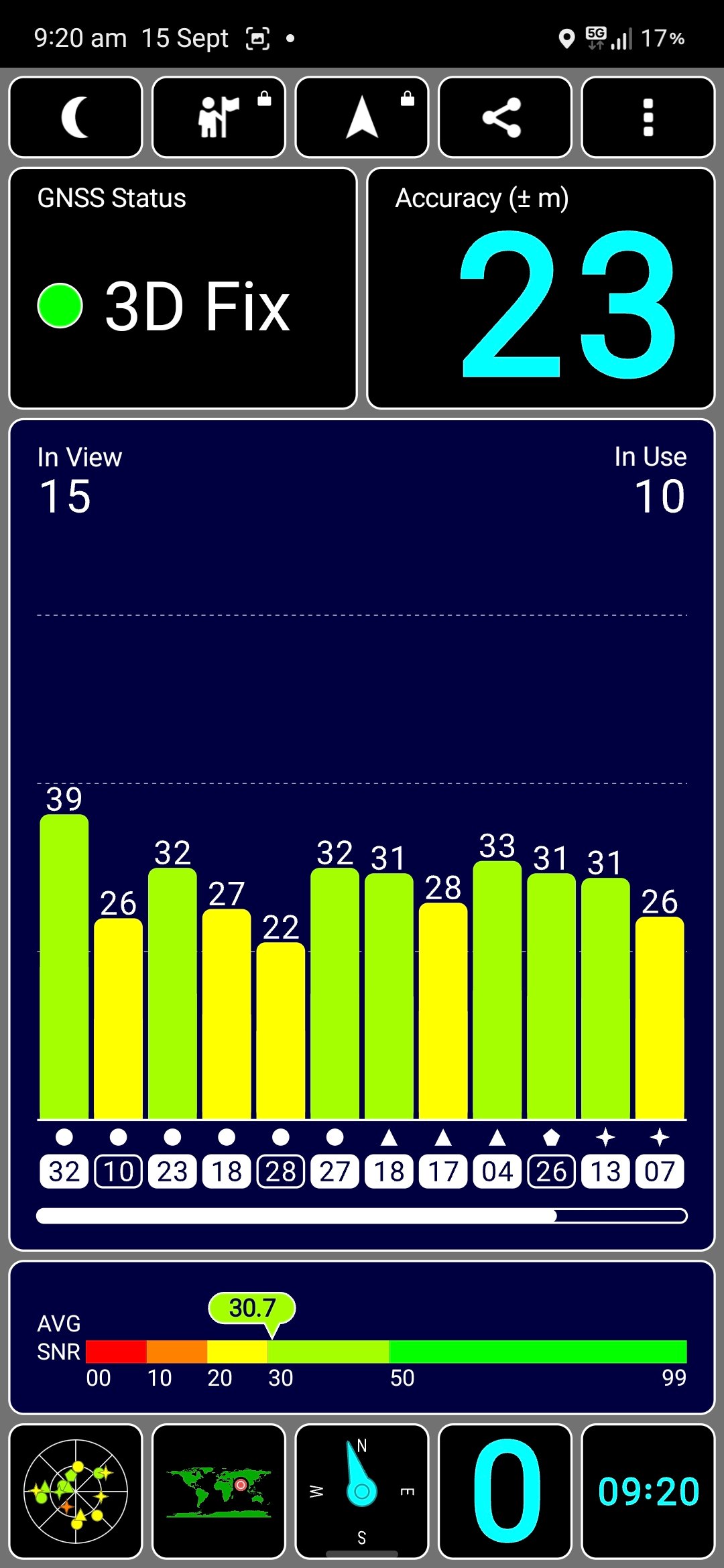
Before you tear your dash apart trying to solve an android car stereo gps not working, run a dedicated sensor check app. Don’t rely on Google Maps or Waze for testing because their cached map data hides actual hardware dropouts. Download GPS Test or GPS Status & Toolbox from the Google Play Store.
Park the car outside in an open area away from concrete structures and review the status bars:
- 0 Satellites in View: The stereo is not physically detecting the antenna hardware. The coaxial line is pinched, severed, or screwed into the wrong rear port.
- 12+ Satellites in View, but 0 in Use (Orange/Grey Bars): The antenna is picking up raw satellite carrier waves, but the processor cannot calculate a fix. This points straight to wrong system time settings or disabled location permissions in Android.
- 5+ Satellites in Use with Solid Green Bars (SNR above 32 dB-Hz): Hardware and antenna reception are working. If Maps still drifts, clear the app cache in Android settings.
If your unit restricts hardware settings at the system level, open your hidden settings menu using our master list of Android car stereo factory passwords to inspect the internal GPS receiver baud rate configuration.
5. Watch Out for Metallic Heat-Rejection Windshield Film
Did your android car stereo gps not working frustration start right after installing dark ceramic sun film? High-end solar-control and sputtered ceramic films use microscopic metal oxide layers to reflect heat. Unfortunately, that coating doubles as an RF shield, bouncing satellite signals away from your dashboard.
The Quick Yardstick Test: Peel the puck off the dash, run the wire out the window, and slap the magnetic base onto your vehicle’s metal roof. If satellite reception jumps from zero to full green bars within 20 seconds, your windshield film is killing the signal. In this case, mount the antenna outside beneath the front plastic wiper cowl, or locate the small untinted dotted area behind your rearview mirror.
Frequently Asked Questions
Why does Google Maps lose signal while Waze or offline maps work?
Open Settings > Apps > Google Maps > Permissions. Ensure location access is set to “Allow all the time” with “Use precise location” toggled on. If background battery optimization is enabled for Google Play Services, the OS will put satellite tracking to sleep.
Can wiring or dead batteries cause an android car stereo gps not working after cold starts?
Yes. If your constant 12V (Yellow/B+) wire drops voltage when the car is parked, read our guide on fixing car stereo battery drain. Sudden power cuts wipe out the GPS receiver’s cached satellite data (almanac), forcing a slow 5-minute cold search every single time you start the car.
How fast should an aftermarket car stereo lock GPS?
On a regular drive where the car was parked for just a few hours (warm start), an Android head unit should lock satellite coordinates within 10 to 25 seconds. If your unit consistently takes longer than 3 minutes to find you, reposition the puck to clear glass.