
Car Radio Not Picking Up FM Stations: 5 Best Proven Ways to Fix Reception
Fix car radio not picking up FM stations by diagnosing antenna phantom power feeds, resolving aftermarket coaxial impedance, and testing tuner RF stages.

Turning on your dashboard receiver only to discover your car radio not picking up FM stations leaves you with background static or an endless auto-seek scan.
You hit scan, but the receiver skips across frequencies without locking onto reliable local broadcasts.
In professional 12-volt car audio diagnostics, a sudden reception drop rarely indicates a completely failed radio tuner.
Common causes typically include unpowered factory antenna boosters, oxidized coaxial connectors, regional tuner setting mismatches, or missing phantom power feeds after an aftermarket stereo swap.
When the antenna circuit lacks power or RF shielding breaks down, signal strength drops below the receiver threshold, directly causing a car radio not picking up FM stations condition.
Before replacing your head unit or routing new cables, methodical bench isolation will pinpoint the exact signal bottleneck quickly.
Here are five practical workshop procedures to troubleshoot why your car radio not picking up FM stations and isolate the signal loss systematically.

Diagnostic Matrix: Decoding FM Reception Failures
Cross-reference your receiver’s scanning behavior against our workshop matrix whenever a car radio not picking up FM stations issue disrupts your drive:
| Observed Receiver Symptom | Underlying Electrical or RF Cause | Immediate Workshop Action |
|---|---|---|
| Radio seeks endlessly without locking stations | Antenna mast disconnected or center coaxial conductor snapped. | Inspect rear DIN antenna plug seating and check center core continuity. |
| Only 1–2 powerful local stations tune in weakly | Active roof base or rear glass antenna amplifier missing +12V power. | Connect head unit blue ANT wire to vehicle powered antenna harness lead. |
| FM is completely dead, but Bluetooth and USB work | Regional tuner frequency step set incorrectly in software settings. | Switch tuner area from Europe/Asia to US (or vice versa) in settings. |
| Reception degrades heavily when engine is running | Alternator brush arcing or LED headlight ballast creating RF noise floor. | Install an inline RF choke filter or inspect chassis ground straps. |
| Reception dropped immediately after radio install | European Fakra to DIN antenna adapter missing powered phantom injector. | Install a 12V blue-wire phantom power adapter for active OEM antennas. |
Step 1: Verify Tuner Band Configuration and Manual Frequency Tuning
Modern touchscreen receivers support global broadcast bands with distinct channel spacing and de-emphasis curves.
If a factory reset or firmware update alters regional presets, the auto-scan function leaps past active local frequencies, creating an artificial car radio not picking up FM stations symptom:
- Access your car stereo’s Settings or Radio Setup menu.
- Verify that the Tuner Region matches your broadcast territory (e.g., USA steps at 200 kHz odd intervals like 99.1, 99.3; Europe/Asia steps at 50 kHz or 100 kHz).
- Check if Local Seek (LOC) or DX/Distance mode is enabled. If “LOC” is active, the tuner ignores moderate signals. Switch the setting to DX (Distance).
- Switch from auto-seek to Manual Tuning mode.
- Type in a known local radio transmitter frequency manually. If audio comes through clearly on manual tuning, the tuner’s auto-seek threshold was set too conservatively.
For official technical parameters on broadcast frequency standards, review the FCC FM Broadcast Radio Technical Service Overview.
RELATED AUDIO FIX
👉 Experiencing audio cutouts when turning the volume up? Complete amplifier and speaker fix guide →
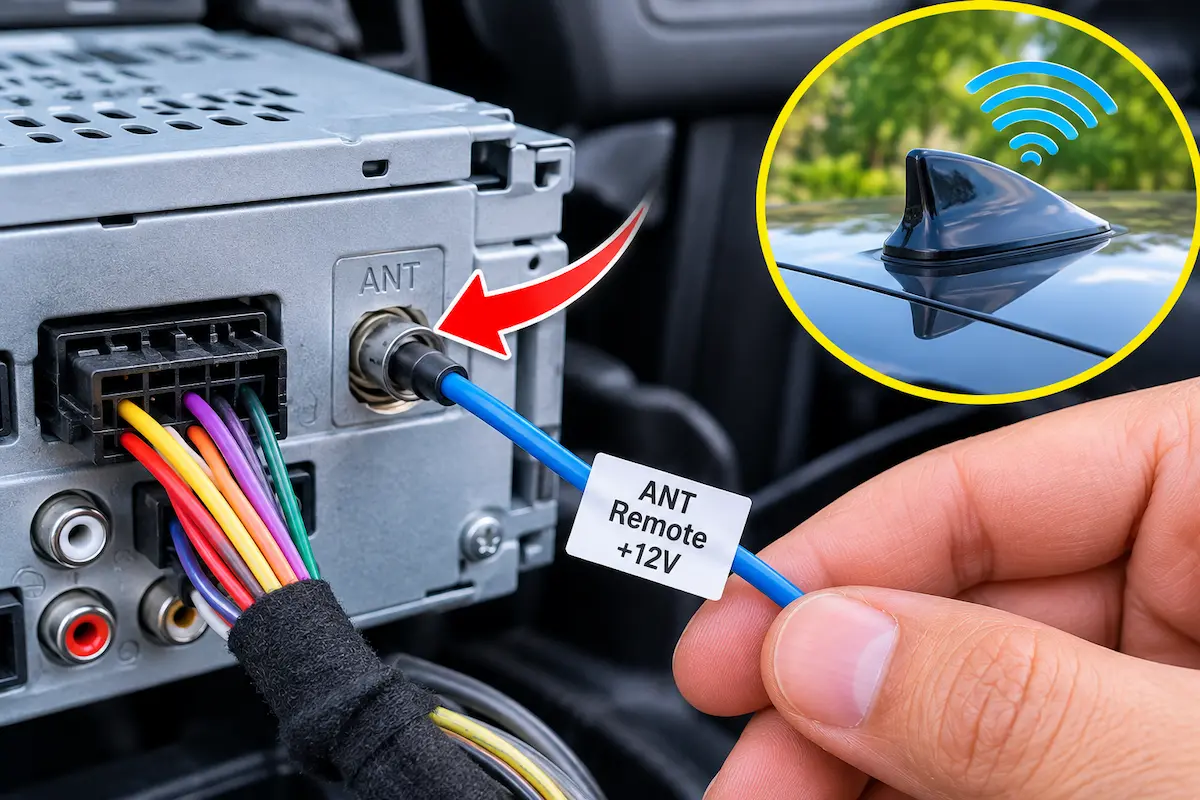
Step 2: Connect the Blue Antenna Remote Power Wire (OEM Booster Feed)
Many modern vehicles (such as Honda, Toyota, and Subaru) utilize active amplified antennas integrated into rear windshield glass or a roof shark fin.
When swapping in an aftermarket or Android stereo, the Solid Blue (Antenna Power) lead is frequently left unpinned.
Without +12V trigger current, internal signal pre-amplifiers remain inactive, leaving your car radio not picking up FM stations except right next to broadcast towers:
- Unmount the car stereo trim to expose the rear wiring harness. Review our workshop guide on connecting factory wiring harnesses to Android units.
- Locate the Solid Blue wire labeled “ANT”, “ANT CONT”, or “Auto Ant” on the stereo side harness according to the manufacturer pinout diagram.
- Identify the antenna turn-on wire in your vehicle-specific adapter harness.
- Join the antenna trigger leads securely using solder and heat-shrink tubing or a verified crimp connector. Avoid confusing the solid blue antenna lead with the blue/white amplifier remote turn-on line.
- Turn the ignition on and verify whether FM reception restores across multiple channels.
Step 3: Test Coaxial Cable Core Continuity and Ground Shielding
Antenna cables are coaxial transmission lines featuring an internal copper conductor surrounded by dielectric insulation and an outer grounded braided shield.
If the center conductor pin backs out behind the dash or the outer braided shield loses chassis grounding, signal attenuation creates an acute car radio not picking up FM stations failure:
- Unplug the thick black Motorola DIN antenna plug from the rear of the radio chassis.
- Switch your digital multimeter selector to the lowest Resistance (Ω) setting.
- Testing Passive Whip Masts: Place one probe on the center brass pin of the DIN plug and the other on the metal base of a passive exterior mast. Resistance should measure under 2.0 ohms. (Note: On active amplified systems, internal circuitry will naturally show higher impedance).
- Touch one probe to the outer metal barrel of the DIN plug and the other to bare vehicle chassis ground; the reading should be near 0 ohms.
- Test between the center pin and the outer barrel; the meter must read Open Loop (OL). If continuity is detected, the coaxial cable has an internal short circuit that drains incoming RF energy.
⚠️ Antenna Power Injection Precaution: Never inject direct 12-volt battery power into an unamplified passive coaxial cable without a verified DC-blocking capacitor. Feeding unmetered DC voltage into a standard radio tuner input risks damaging sensitive front-end RF receiver inductors.
RELATED AUDIO FIX
Step 4: Install a Powered Phantom Antenna Adapter (European Platforms)
Many European vehicles (such as Volkswagen, Audi, and BMW) supply power to their antenna booster modules directly through the coaxial cable’s center conductor rather than a separate power wire.
Factory head units deliver this phantom voltage internally, but aftermarket radios do not supply DC on the antenna socket.
Without an active phantom adapter, your car radio not picking up FM stations issue will continue on an aftermarket head unit:
- Identify your vehicle’s factory antenna terminal (typically a single or double Fakra connector).
- Acquire an active Fakra-to-DIN Phantom Adapter matching your vehicle harness configuration.
- Plug the vehicle Fakra line into the adapter input and insert the standard DIN terminal into the radio antenna jack.
- Connect the adapter’s single blue fly-lead to the stereo switched accessory (ACC) or antenna turn-on wire.
- This injects clean DC voltage down the coaxial line to power the factory base amplifier while keeping DC voltage out of the aftermarket tuner.
RELATED AUDIO FIX
👉 Speakers crackling or popping during playback? Complete audio circuit diagnosis walkthrough →
Step 5: Isolate 12V Accessory and LED Ballast RF Interference
Unshielded aftermarket 12V USB chargers, dash cameras, and low-quality LED headlight drivers can emit high-frequency electromagnetic interference across the 88–108 MHz spectrum.
This raises the background noise floor and overpowers incoming FM radio broadcast signals:
- Unplug all 12V accessory plugs, dash cams, and phone chargers one by one while scanning the radio to see if reception clears.
- Turn off the headlights; if signal strength improves instantly, unshielded LED ballasts are radiating RF noise.
- Reroute dash cam wiring away from the A-pillar where the factory antenna coaxial cable typically descends into the dashboard.
- Install snap-on ferrite core suppressors on the power leads of any aftermarket accessories to suppress EMI emissions.
- If your stereo displays unpredictable power behavior, review our walkthrough on car stereo battery drain to verify proper accessory circuit shutoff.
Troubleshooting a persistent car radio not picking up FM stations issue involves systematically verifying RF physical connections, verifying tuner settings, and ensuring antenna boosters receive required power.
Switching tuner parameters to distance DX mode, connecting the factory antenna booster lead, and isolating noisy 12V charging accessories helps isolate the exact root cause before replacing hardware components.
Follow these diagnostic checks whenever your car radio not picking up FM stations leaves your cabin with poor signal reception.
Frequently Asked Questions (FAQ)
Why is my car radio not picking up FM stations suddenly?
A car radio not picking up FM stations usually occurs when the antenna plug loosens behind the head unit, the roof amplifier loses switched trigger power, or unshielded accessories emit high RF interference across the FM spectrum.
Why does an aftermarket stereo have worse FM reception than factory?
Factory radios supply power to built-in antenna boosters automatically. Aftermarket stereos often require connecting the solid blue antenna wire or adding a phantom power injector to energize the vehicle antenna pre-amplifier.
Can LED headlights cause car radio not picking up FM stations?
Yes. Low-quality LED headlight drivers and cheap 12V phone chargers emit electromagnetic noise across the 88–108 MHz range, which raises the RF noise floor and blocks weak or moderate FM signals.