
Android Car Stereo Bluetooth Wont Turn On: 5 Best Proven Workshop Fixes
Fix an Android car stereo where the Bluetooth toggle won't turn on or remains greyed out by troubleshooting MCU module settings, antenna leads, and hardware daemon caches.

Starting up your vehicle wanting hands-free calling and streaming only to discover your android car stereo bluetooth wont turn on leaves you completely isolated from calls and wireless projection.
You tap the Bluetooth icon on the touchscreen repeatedly, but the software toggle slider snaps immediately back to the off position, stays completely frozen in a dull grey state, or displays an endless “Turning on Bluetooth” loop.
In professional 12-volt car audio diagnostics, an unresponsive Bluetooth toggle switch rarely indicates that the entire Android motherboard is fried.
Common causes typically include corrupted Bluetooth daemon cache files, MCU firmware desynchronization, unseated external Wi-Fi and Bluetooth pigtail antennas, incorrect Bluetooth hardware module selection in factory developer menus, or temporary power-rail voltage brownouts during engine cranking.
Because Android head units rely on an auxiliary hardware microchip soldered to the board that interfaces directly through proprietary MCU instructions rather than standard smartphone chipsets, any firmware or configuration glitch causes an android car stereo bluetooth wont turn on error.
Before paying for expensive bench repairs or replacing your aftermarket stereo, systematic verification of internal factory module settings and software cache will restore wireless connectivity fast.
Here are five practical workshop procedures to troubleshoot why your android car stereo bluetooth wont turn on and get your wireless connections working reliably again.

Diagnostic Matrix: Decoding Frozen Bluetooth System States
Cross-reference your head unit’s Bluetooth symptoms against our workshop matrix whenever an android car stereo bluetooth wont turn on condition occurs:
| Observed Bluetooth Symptom | Underlying Hardware or Software Cause | Immediate Workshop Action |
|---|---|---|
| Toggle slider snaps back to OFF immediately when tapped | Corrupt Bluetooth service cache or stuck Android system daemon. | Force stop the Bluetooth app and clear app storage cache. |
| Bluetooth icon completely greyed out and unclickable | Factory settings MCU module type configured to incorrect IC driver. | Enter Factory Settings and select the matching Bluetooth chip profile. |
| Stuck in “Turning Bluetooth ON…” permanent loading loop | System firmware desynchronization between Android OS and MCU. | Perform a dedicated pinhole hardware RST button reboot. |
| Bluetooth turns on but phone fails to detect the stereo | Unscrewed or unpinned rear Wi-Fi/Bluetooth gold pigtail antenna. | Inspect and tighten rear RCA harness antenna lead connections. |
| Bluetooth drops and refuses to re-enable after engine start | Battery voltage drop during engine crank causing chip latch-up. | Verify 12V ACC stability and check internal power sleep policy. |
Step 1: Perform an MCU and Hardware Pinhole RST Reset
Android head units operate using two separate layers: the Android operating system and the Microcontroller Unit (MCU).
The MCU controls raw hardware functions, including physical volume knobs, CAN bus communications, and auxiliary Bluetooth daughterboards.
If the MCU registers an unexpected power fluctuation, the Bluetooth chip can enter a protected latch-up state where the android car stereo bluetooth wont turn on through normal screen taps:
- Locate the tiny RST (Reset) pinhole on the front bezel of your stereo (often found near the volume knob, SD card slot, or microphone hole).
- Using an unbent paperclip or SIM ejector tool, press and hold the button inside the pinhole for 10 to 15 seconds while the car ignition is turned ON.
- Release the button when the screen goes black and the boot logo reappears.
- Allow the stereo to complete a full cold reboot into the home screen.
- Navigate back to Bluetooth settings and test the toggle switch.
- If your stereo also resets its clock presets after restarting, review our diagnostic on fixing car stereo time and settings reset.
Whenever your android car stereo bluetooth wont turn on, a hardware pinhole reset forces the MCU to re-initialize power rails to the internal Bluetooth hardware chip.
For technical reference on automotive Bluetooth hardware architecture, review the Bluetooth SIG Automotive Core Specifications.
RELATED DISPLAY FIX
👉 Touchscreen completely unresponsive to touch taps? Touch panel digitizer repair walkthrough →
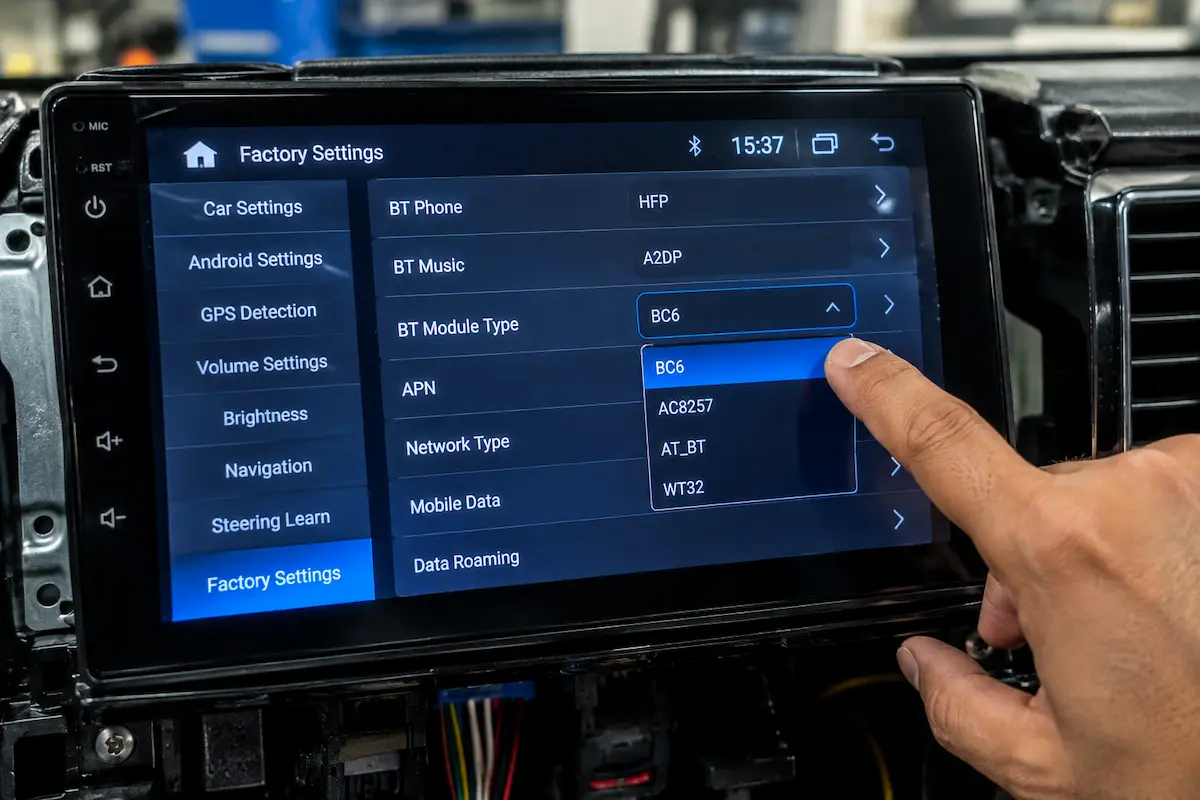
Step 2: Correct the Bluetooth Module Type in Factory Settings
Aftermarket Android units (such as Allwinner T3L, AC8227L, TS10, and FYT boards) support multiple swappable Bluetooth IC chips (such as SD-968, IVT, GOC, BC6, or RTL8723).
If a system update was installed, or if factory settings were reset, the software may select an incorrect Bluetooth module driver profile.
When the Android OS attempts to communicate with a chip driver that does not physically exist on the motherboard, your android car stereo bluetooth wont turn on and stays greyed out:
- Open the app drawer and launch Car Settings or Factory Settings.
- Enter your unit’s factory unlock passcode (common codes include
8888,123456,3368, or000000). You can verify your exact PIN from our master list of Android car stereo factory settings passwords. - Scroll through the menu to find Bluetooth Module, BT Type, or Protocol Parameter.
- Check the currently selected module name. Note down the current selection.
- Switch the profile to the alternative supported module (for example, if set to IVT, change to SD-968 or MD102).
- Tap Save or Apply and allow the head unit to automatically reboot.
- Check the Bluetooth menu after booting up to verify if the toggle is now active.
Configuring the correct hardware module profile bridges the software driver with the physical chip, instantly curing an android car stereo bluetooth wont turn on error.
Step 3: Clear System Bluetooth Cache and Storage Daemons
Just like standard Android smartphones, car stereos run a dedicated system background package called com.android.bluetooth.
Over time, corrupted pairing metadata, half-completed hands-free phonebook synchronization, or dropped wireless projection attempts corrupt the local SQLite database.
When this internal database locks up, the operating system aborts startup routines, leaving your android car stereo bluetooth wont turn on:
- Open the main Android Settings app on your head unit (not the vehicle skin menu).
- Select Apps & Notifications (or Application Manager).
- Tap See all apps and tap the three dots in the upper corner to select Show System Apps.
- Scroll down and select Bluetooth (or Bluetooth Share).
- Tap Force Stop, then tap OK.
- Select Storage & Cache.
- Tap Clear Cache, followed by Clear Storage.
- Reboot the head unit to allow Android to generate clean configuration files. If your steering wheel controls also disconnect after updates, check our guide on steering wheel controls not working.
⚠️ Pairing History Notice: Clearing Bluetooth storage erases previously paired phone profiles and custom device names. You will need to pair your smartphones fresh once the toggle switch is successfully re-enabled.
RELATED AUDIO FIX
👉 Phone connects successfully over Bluetooth but zero sound plays? Audio profile routing fix →
Step 4: Inspect Rear Harness Bluetooth Antenna and Grounds
Many aftermarket Android head units use a combined external antenna lead for Wi-Fi and Bluetooth reception.
This connector is typically an SMA threaded gold pin or a dedicated single-wire pigtail coming off the main multi-pin RCA auxiliary harness.
If this lead is unpinned, pinched behind the dashboard metal cage, or shorted against bare metal, signal transmission halts immediately, causing the system daemon to flag hardware failure and resulting in your android car stereo bluetooth wont turn on:
- Carefully slide the Android head unit out from the dashboard cage to inspect rear connections.
- Locate the auxiliary multi-pin harness that carries RCA audio, video inputs, and external leads.
- Find the small black or yellow coaxial wire labeled WIFI/BT ANT or ANT-BT.
- Ensure this antenna wire is fully seated and not touching unpainted metal chassis brackets.
- If your unit features a threaded gold SMA terminal, ensure the external paddle antenna is screwed on firmly.
- If Wi-Fi connections also drop periodically in your car, consult our workshop guide on Android car stereo Wi-Fi keeps disconnecting.
Securing external antenna lines ensures the radio transceiver operates within safe impedance ranges, preventing scenarios where your android car stereo bluetooth wont turn on due to hardware self-protection.
RELATED PAIRING GUIDE
👉 Stereo refusing to pair with your smartphone? Pairing code and cache diagnostic walkthrough →
Step 5: Verify 12V ACC Voltage and Disable Deep Fast Boot
Modern Android stereos feature a standby setting called Fast Boot or Sleep Mode that allows the system to wake in two seconds.
However, when the car starts up, starter motor cranking causes system battery voltage to sag from 12.6V down to 9.5V–10.5V.
This transient voltage dip can brown out the low-voltage Bluetooth chip while the main processor survives, causing an issue where your android car stereo bluetooth wont turn on until the car is completely powered down:
- Open Car Settings > Factory Settings or Power Management.
- Locate the setting labeled Auto Sleep or Standby Time.
- Change the setting from Always Sleep to “Power off completely” or “Shut down after 2 hours”.
- This forces the stereo to execute a complete power-off whenever you remove the ignition key, ensuring that the internal Bluetooth daughterboard receives fresh power upon every cold start.
- If your car battery suffers from unexplained drain while parked, check our workshop walkthrough on diagnosing Android car stereo battery drain.
Troubleshooting a stubborn android car stereo bluetooth wont turn on issue comes down to re-synchronizing software drivers with internal motherboard hardware.
Executing an MCU hardware pinhole reset, selecting the correct Bluetooth module type in factory settings, clearing corrupt system Bluetooth storage cache, inspecting rear antenna leads, and disabling problematic fast-boot sleep states will systematically restore reliable wireless pairing.
Follow these workshop steps whenever the Bluetooth switch freezes on your dashboard display, ensuring you eliminate any android car stereo bluetooth wont turn on errors permanently.
Frequently Asked Questions (FAQ)
Why does my android car stereo bluetooth wont turn on when tapped?
An android car stereo bluetooth wont turn on issue is usually caused by an incorrect Bluetooth module driver selected in Factory Settings, a corrupted Bluetooth system cache database, or an MCU firmware desynchronization requiring a hardware pinhole reset.
How do I change the Bluetooth module in Android car stereo factory settings?
Open Car Settings > Factory Settings, enter your device unlock passcode (such as 8888 or 123456), locate the Bluetooth Type or BT Module setting, choose an alternative compatible chip profile (like SD-968, IVT, or GOC), tap Save, and allow the unit to reboot.
Why is the Bluetooth icon greyed out on my Android car screen?
When the Bluetooth icon is greyed out and unclickable, the Android OS is unable to detect the physical Bluetooth chip on the motherboard. This typically indicates a software protocol mismatch in factory settings or an unseated hardware antenna wire.